Back to learning center
What is accounts receivable matching? (and how AI is transforming it)


Accounts receivable matching – also called cash application – is the process of identifying which customer payment corresponds to which open invoices, then recording that payment to close the receivable in the company’s accounting system.
In B2B finance, customers don’t swipe a card. They send a payment (wire, ACH, or check) and, separately, a remittance advice document listing which invoices the payment covers. That document might be a multi-page PDF, a disorganized email, or a spreadsheet with a layout unique to that customer. Someone on the AR team has to open and read it, understand and extract the details line by line, cross-reference each entry against open invoices in the ERP, and record the match.
This is accounts receivable matching. At enterprise scale, it happens thousands of times a month within finance departments. When the process breaks down, cash sits unapplied. Days sales outstanding (DSO) inflates. Collection teams chase invoices that have already been paid.
Receivable matching has always been labor-intensive. However, a meaningful transformation is underway. Modern AI agents go beyond simple rule-based automation to actually read and understand remittance documents the way a trained AR analyst would and then perform the cash application with deterministic mathematical accuracy. The result is a shift from approximately 20% auto-match rates to over 80%, compressing days of reconciliation into minutes.
Accounts receivable matching, also called cash application, is the process of applying an incoming customer payment to the specific open invoice or invoices it was intended to cover. In B2B finance, the payment and the remittance advice arrive separately. The matching process bridges them, connecting the money in the bank to the correct line items in the AR subledger.
For many AR teams, this is the primary daily workload. At enterprise scale, receivable matching happens thousands of times per month across hundreds of customers, each with their own payment habits, document formats, and timing.
The matching principle in accounts receivable means each payment is applied to the specific invoices it covers, not simply recorded as generic revenue. Proper matching ensures accurate AR aging reports, correct revenue recognition by period, and a clean audit trail for every transaction. Without it, the finance team cannot trust its aging data, and period-end close is delayed while unmatched items are investigated.
When matching breaks down, the consequences compound quickly. Unmatched payments distort AR aging, inflate DSO, and trigger unnecessary collection activity on invoices that were already paid. This creates friction with customers and delays the financial close cycle.
The relationship between AR matching and invoice reconciliation is often misunderstood. AR matching is the receiving side, applying inbound payments. Invoice reconciliation is the paying side, verifying outbound vendor invoices before releasing payment. Both involve matching documents to records, but they operate in opposite directions.
The root cause of manual matching complexity is a single document: the remittance advice. This is the notice a customer sends alongside a payment to specify which invoices are being covered. Without it, the AR team has only the payment amount to work with, and when a single payment covers multiple invoices, amount-only matching fails immediately.
The format variability problem. Every customer sends remittance advice differently. One sends a multi-page PDF with line items buried in a table on page three. Another includes payment details in the email body without a consistent structure. A third exports a spreadsheet formatted unlike any other. There is no standard layout, no consistent field naming, and no reliable structure across the customer base.
The manual extraction burden. An AR analyst must open each remittance document, visually identify the relevant data, extract invoice numbers, amounts, and notes by hand, then cross-reference each line against open invoices in SAP, Oracle, or the company’s ERP.
The discrepancy problem. Customers frequently pay short. An early-payment discount taken, a deduction for damaged goods, or a disputed line item creates a mismatch between what was invoiced and what was paid. Each discrepancy requires investigation before the payment can be posted.
The volume problem. Enterprises processing thousands of invoices monthly face a matching burden that compounds as the business grows. Adding customers adds manual work linearly; each new account brings new remittance formats and new exception patterns.
The baseline. Without AI, teams typically auto-match around 20% of payments. The remaining 80% requires human intervention. This 20% figure is the benchmark that accounts receivable AI improves against.
The end-to-end accounts receivable matching process follows seven stages. Steps 2 through 6 are where manual effort concentrates – and where AI delivers the most impact.
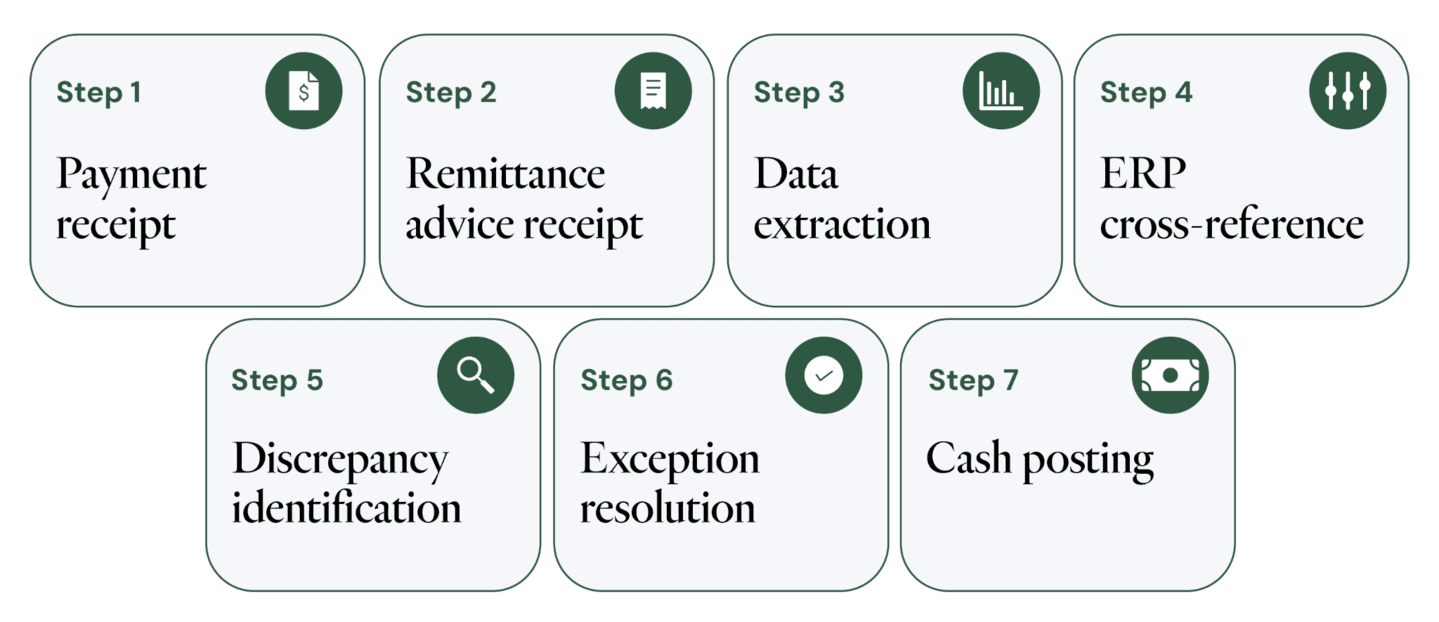
AR teams evaluating automation consistently point to five operational challenges that consume staff hours and resist process improvement.
Remittance document chaos. PDFs arrive with no consistent layout. Emails bury payment details in body text alongside unrelated correspondence. Spreadsheets are formatted differently by every customer, sometimes by every payment from the same customer. Traditional OCR and template-based extraction tools break down because there is no template to match against.
Missing remittance data. Many customers pay without sending a remittance document at all. The AR team receives a lump-sum payment and must determine which invoices it covers through manual investigation, by comparing amounts, by contacting the customer, or by using heuristic matching that fails for multi-invoice payments.
Short-pays and deductions. A customer who took a 5% early-payment discount, deducted for a damaged shipment, or withheld payment on a disputed line item creates a discrepancy between the invoiced and paid amounts. Resolving these requires detective work: reviewing contracts, checking delivery records, and validating discount eligibility. This investigation consumes the majority of AR staff hours.
Volume compounding. The accounts receivable matching burden scales linearly with revenue growth. Every new customer adds a new set of remittance formats, payment patterns, and exception types. Without automation, headcount must grow in proportion to transaction volume.
The 20% auto-match baseline. Without AI, teams typically auto-match around 20% of payments using basic rules (exact amount match on a single invoice). The remaining 80% requires human intervention, a ratio that grows more painful as transaction volume increases.
Modern accounts receivable AI addresses the matching challenge through a two-layer architecture that separates document understanding from mathematical execution. This distinction matters for finance teams: the AI reads and interprets documents, but it never guesses on calculations.
Layer 1: Document Intelligence. A Sema4.ai Agent reads a multi-page remittance PDF or a chaotic email and extracts line-by-line data – invoice numbers, payment amounts, discount notations, and dispute references. The agent understands what the document means the way a trained AR analyst would. No rigid templates. No format requirements. The LLM handles the interpretation of any document structure, adapting automatically to new customer formats without configuration.
Layer 2: Deterministic matching logic. Once data is extracted, structured SQL-powered logic handles the actual mathematical matching and calculations. The agent compares extracted amounts against open invoices in the ERP, identifies exact matches, partial matches, and exceptions – all with 100% mathematical precision. AI is used to read and interpret. SQL is used to calculate and match. Every result is fully auditable and reproducible.
The result: auto-match rates from 20% to over 80%. Companies using Sema4.ai Agents for automated cash applications compress reconciliation time from days to minutes. The agent processes thousands of remittance documents autonomously, matching payments to invoices without human intervention for the vast majority of transactions.
Human-in-the-loop for genuine exceptions. When a payment genuinely cannot be matched automatically – a customer paying a round number with no remittance detail, for example – the agent flags the exception and hands it to a human AR manager with full context: what was attempted, what data is available, and why confidence is low. The agent learns from the human’s resolution for next time.
Finance teams handling thousands of B2B payments each month are moving beyond manual remittance processing to AI agents that read any document format, match payments with deterministic accuracy, and escalate only genuine exceptions. See how Sema4.ai boosts auto-match rates from 20% to over 80% →
| Term | Definition | Relationship to AR matching | Common confusion |
| AR matching / Cash application | The process of applying a customer payment to its corresponding open invoices in the ERP. | These are the same process – two labels for the identical workflow. | Teams use both terms interchangeably; neither is more precise. |
| Invoice reconciliation | Verifying that a vendor invoice is accurate and authorized before payment is released. | The opposite direction – AR matching is the receiving side; invoice reconciliation is the paying side. | Finance teams often conflate the two because both involve matching documents to records. |
| Remittance advice | The document a customer sends alongside a payment specifying which invoices are being paid. | The primary input to the AR matching process – without it, matching must be done by payment amount alone. | Often assumed to be standardized; in practice it arrives in dozens of inconsistent formats. |
| Short-pay / Deduction | A payment that is less than the invoiced amount, typically due to a discount, dispute, or damaged goods. | Creates a discrepancy that must be investigated before the payment can be posted. | Teams differ on whether to post a partial match or hold the invoice open pending resolution. |
What is accounts receivable matching?
Accounts receivable matching, also called cash application, is the process of identifying which customer payment corresponds to which open invoices, then recording that payment to close the receivable in the accounting system. It is the AR team’s primary daily workload in B2B finance environments.
What is cash application?
Cash application is another term for accounts receivable matching. When a customer payment arrives, cash application is the process of applying that payment to the specific invoices it was intended to cover, closing those receivables in the ERP. The two terms describe the same workflow.
What is remittance advice?
Remittance advice is the document a customer sends alongside a payment to specify which invoices are being paid. It is the primary input to the AR matching process. In B2B finance, remittance advice arrives in inconsistent formats, PDFs, emails, spreadsheets, making manual extraction the core bottleneck in cash application.
What is the matching principle in accounts receivable?
The matching principle in accounts receivable means each incoming payment is applied to the specific invoice or invoices it was intended to cover, not recorded as generic revenue. Proper matching ensures accurate AR aging, correct revenue recognition, and a clean audit trail for every transaction.
What are the most common challenges in AR matching?
The most common challenges are remittance document inconsistencies (each customer uses a different format), missing remittance data, short-pays that require investigation before posting, and high volume. Together, these limit manual auto-match rates to around 20%, requiring human intervention for the remaining 80% of payments.
How does AI automate accounts receivable matching?
AI automates AR matching through a two-layer approach: LLMs read and interpret remittance documents in any format, extracting line-item data the way a human would. Deterministic SQL logic then performs the actual matching calculations, ensuring 100% auditable accuracy. This approach raises auto-match rates from approximately 20% to over 80%.
How does Sema4.ai ensure accuracy in AI-powered AR matching?
Sema4.ai separates document understanding from mathematical execution. The LLM reads and interprets the remittance document; structured SQL-powered logic performs the matching and calculations. This means AI is never guessing account balances or invoice totals. Every match is fully auditable. Genuine exceptions are escalated to a human with full context.
What is the difference between accounts receivable matching and invoice reconciliation?
AR matching (cash application) is the receiving side: applying inbound customer payments to open invoices. Invoice reconciliation is the paying side: verifying that a vendor invoice is accurate and authorized before releasing payment. Both involve matching documents to records, but they operate in opposite directions within the finance function.
Finance teams handling thousands of B2B payments each month are moving beyond manual remittance processing to AI agents that read any document format, match payments with deterministic accuracy, and escalate only genuine exceptions.
Additional resources

 Learn about Agent Studio